Have you ever received a phone call and noticed the words Wireless Caller appearing on your screen instead of a person’s name or phone number? You might wonder who is calling, why their identity is not displayed, or whether the call is safe to answer.
The phrase Wireless Caller generally means that an incoming call is being identified as coming from a wireless or mobile telephone connection. Instead of displaying the caller’s actual name or number, your phone or carrier may show a general label such as “Wireless Caller.”
In simple terms, it usually indicates that the call is associated with a mobile phone service rather than a traditional landline. However, it does not tell you exactly who is calling.
Seeing this label does not automatically mean the call is a scam, but it also does not guarantee that the caller is trustworthy.
In this guide, you’ll learn the wireless caller meaning, why it appears, how it works on different phones, whether you should answer, and what you can do about unwanted calls.
1. Wireless Caller Meaning in Simple Words
Wireless Caller is a caller identification label that may appear when someone calls you using a wireless or mobile telephone connection.
Instead of showing a recognizable contact name or a complete phone number, the incoming call may display the general description “Wireless Caller.”
For example, imagine your phone rings and the screen displays:
Wireless Caller
You might expect to see a name such as John Smith or a number such as 555-123-4567. Instead, your device displays a generic description.
This can happen because of how the caller’s information is transmitted, how your mobile carrier identifies the call, or how your phone’s caller ID system displays available information.
Quick Meaning Table
| Term | Meaning |
|---|---|
| Wireless Caller | A general label associated with a wireless phone call |
| Wireless Phone | A phone that connects through a wireless network |
| Caller ID | Information displayed about an incoming caller |
| Unknown Caller | A caller whose identity is not recognized or displayed |
| Private Number | A call where the caller’s number is hidden |
| No Caller ID | A label indicating that caller identification is unavailable or withheld |
Important: Wireless Caller does not identify a specific person. It describes the call’s displayed identification, not necessarily the caller’s identity.
2. What Does Wireless Caller Mean When Someone Calls You?
When you receive a call labeled “Wireless Caller,” it generally means that the caller’s connection has been identified as wireless by the telephone network or caller ID system.
However, the exact reason for this label can vary.
Possible explanations include:
- The call is coming from a mobile phone.
- Your carrier is displaying a generic wireless caller description.
- The caller’s name is not available in the caller ID database.
- The calling information is not being transmitted or displayed completely.
- Your phone or carrier uses a general label instead of a specific caller name.
For example, someone may call you from their personal mobile phone, but your screen displays “Wireless Caller” rather than their actual name.
This does not necessarily mean they are hiding their identity. Their number or name may simply not be available through the caller ID information provided to your phone.
3. Why Does Wireless Caller Appear on Your Phone?
There are several reasons why your phone might display the words “Wireless Caller.”
Understanding these possibilities can help you decide whether the call is worth answering.
1. The Caller Is Using a Mobile Phone
The most straightforward explanation is that the incoming call is associated with a wireless telephone connection.
Some caller ID systems use general labels to describe the type of telephone service instead of displaying a person’s name.
2. The Caller Is Not Saved in Your Contacts
If the caller is not saved in your phone, your device may not recognize their identity.
Depending on your carrier and caller ID service, the screen might display a generic label rather than a personal name.
3. Caller ID Information Is Incomplete
Caller ID depends on information transmitted through telephone networks and interpreted by your carrier or device.
If the caller’s name is unavailable, incomplete, or not supported by the service, a general description may appear.
4. Your Carrier Uses Generic Caller Labels
Different mobile carriers and telephone services handle caller identification differently.
One carrier may display a phone number, while another may show a generic description such as “Wireless Caller.”
5. The Call Comes Through an Internet-Based Phone Service
Some services allow people to make calls through internet-connected applications or business telephone systems.
Depending on how the call is routed and identified, the caller ID information may appear differently from a regular mobile call.
6. The Caller ID System Cannot Identify the Caller
Sometimes the telephone network cannot provide a recognizable name for an incoming call.
Your screen may then display a generic label rather than a specific identity.
4. Is Wireless Caller a Real Person or a Scam?
Seeing “Wireless Caller” does not automatically mean that the incoming call is fraudulent.
It may be a completely legitimate call from someone using a mobile telephone service.
For example, the call could come from:
- A friend or family member.
- A delivery driver.
- A business representative.
- A customer service employee.
- A person calling from an unfamiliar mobile number.
- An individual whose caller information is not available.
However, scammers can also use phone numbers and caller ID information that make their calls appear unfamiliar or misleading.
How to Recognize a Suspicious Wireless Caller
Be careful if the caller:
- Asks for your password or account login details.
- Requests your bank information or card number.
- Demands an urgent payment.
- Claims that you have won a prize but must pay a fee.
- Threatens legal action unless you respond immediately.
- Asks you to share a verification code.
- Pressures you to install an unfamiliar application.
A legitimate organization should not pressure you into sharing sensitive information through an unexpected phone call.
Safety tip: If someone claims to represent a bank, government agency, or business, end the call and contact that organization through its official contact information.
5. Wireless Caller vs. Unknown Caller vs. No Caller ID
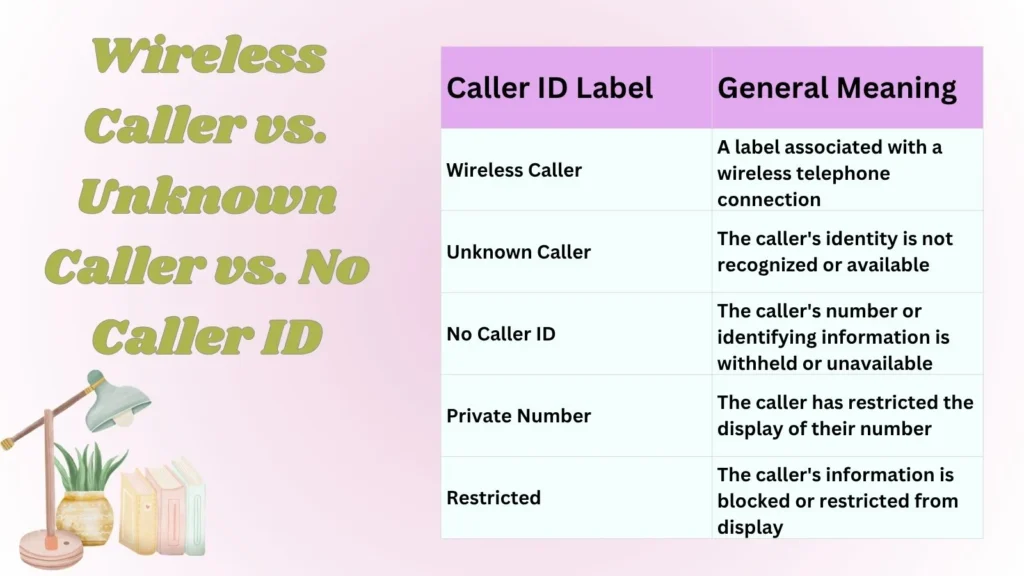
These terms may look similar on your phone, but they do not necessarily mean the same thing.
| Caller ID Label | General Meaning |
|---|---|
| Wireless Caller | A label associated with a wireless telephone connection |
| Unknown Caller | The caller’s identity is not recognized or available |
| No Caller ID | The caller’s number or identifying information is withheld or unavailable |
| Private Number | The caller has restricted the display of their number |
| Restricted | The caller’s information is blocked or restricted from display |
Wireless Caller vs. Unknown Caller
A Wireless Caller label may indicate that the call is associated with a mobile telephone service.
An Unknown Caller label generally means that the phone cannot identify the caller.
Wireless Caller vs. No Caller ID
A Wireless Caller label does not necessarily mean the caller has hidden their number.
No Caller ID usually indicates that the caller’s number is withheld or unavailable for display.
Wireless Caller vs. Private Number
A private number usually means the caller has chosen to restrict their number from appearing on the recipient’s screen.
A Wireless Caller label, on the other hand, may simply be a general description of the call.
The exact behavior depends on the phone, network, and caller ID service.
6. What Does Wireless Caller Mean on iPhone?
On an iPhone, the words “Wireless Caller” may appear when an incoming call is identified through carrier information or another caller ID service.
Your iPhone does not always receive a person’s complete name and identity with every incoming call.
For example, if someone calls from a mobile number that is not saved in your contacts, the caller ID information available to your network may be displayed as a generic label.
Why Does My iPhone Show Wireless Caller Instead of a Name?
Possible reasons include:
- The number is not saved in your contacts.
- The carrier provides a generic caller description.
- The caller’s name is unavailable.
- The caller ID information is incomplete.
- A third-party caller identification service provides the displayed information.
How to Handle Wireless Caller Calls on iPhone
You can use several built-in iPhone features to manage unfamiliar calls.
Option 1: Silence Unknown Callers
- Open the Settings app.
- Select Apps.
- Open Phone.
- Look for the Silence Unknown Callers option.
- Turn it on if you want eligible calls from unsaved numbers to be silenced.
The exact settings layout may vary depending on your iOS version.
Option 2: Block a Specific Number
- Open the Phone app.
- Go to Recents.
- Find the unfamiliar call.
- Tap the information icon next to it.
- Select Block Caller if the option is available.
Blocking is useful when the same unwanted number repeatedly contacts you.
7. What Does Wireless Caller Mean on Android?
On Android phones, “Wireless Caller” may appear because of the way your mobile carrier, device manufacturer, or caller identification service processes incoming calls.
Android devices from different manufacturers may display caller information differently.
For example, a Samsung phone, Google Pixel, or another Android device may use different caller ID features.
Why Does Android Show Wireless Caller?
Common explanations include:
- The caller’s number is not saved.
- The network provides a generic caller description.
- Caller ID information is incomplete.
- Your device cannot match the incoming number to a recognized contact.
- Your carrier or caller identification application displays a general label.
How to Block an Unwanted Caller on Android
The steps can vary by device, but the general process is:
- Open the Phone application.
- Select Recent calls.
- Find the unwanted call.
- Tap the number or caller information.
- Select Block or Report spam if available.
You can also check your phone’s caller ID and spam protection settings.
8. Should You Answer a Wireless Caller Call?
Whether you should answer depends on the situation.
A Wireless Caller label alone is not enough to determine whether a call is safe or dangerous.
If you are expecting a call from a delivery service, business, healthcare provider, or someone using an unfamiliar number, it may be reasonable to answer.
However, if the call seems suspicious, you can let it go to voicemail.
When It May Be Safe to Answer
Consider answering when:
- You are expecting an important call.
- You recognize the approximate time or context.
- The call may be from a legitimate business.
- You are waiting for a response from someone using a different phone.
When You Should Be Careful
Avoid trusting a caller simply because they sound professional or claim to represent a familiar organization.
Be especially careful if they:
- Request personal information.
- Ask for financial details.
- Demand immediate payment.
- Request a one-time password.
- Try to create panic or urgency.
If you are unsure, do not share sensitive information. Verify the caller’s identity independently.
9. Can a Wireless Caller See Your Phone Number?
In many ordinary telephone calls, the person receiving your call can see your phone number if your caller ID information is enabled and transmitted.
However, what they see depends on your caller ID settings, carrier policies, and the type of telephone service you use.
If your number is restricted, the recipient may see a label such as:
- Private Number
- No Caller ID
- Restricted
- Unknown
The label “Wireless Caller” does not automatically mean that your number is hidden.
It is simply a general caller identification description that may be displayed by a network or device.
10. Can You Find Out Who Is Behind a Wireless Caller?
Sometimes you can identify the person, but the label alone does not reveal their identity.
Here are a few practical methods.
1. Check Your Recent Calls
Open your phone’s call history and see whether a complete number appears alongside the Wireless Caller label.
If a number is available, you may be able to identify it through a trusted caller identification service.
2. Check Your Voicemail
A legitimate caller may leave a message explaining their name and reason for calling.
Listen carefully before returning the call.
3. Search the Number Online
If a phone number is displayed, you can search for it to see whether it is publicly associated with a business or reported as spam.
Be cautious with websites that request payment or personal information to reveal caller identities.
4. Contact the Person Through Another Channel
If you suspect the call came from someone you know, contact them through a communication method you already trust.
5. Ask Your Carrier
Your mobile carrier may be able to explain why a generic caller ID label appears on your device.
However, privacy rules may prevent the carrier from revealing another person’s identity.
11. How to Stop Repeated Wireless Caller Calls
If you receive repeated unwanted calls labeled Wireless Caller, there are several ways to reduce interruptions.
Block the Number
If a phone number is available, block it through your device’s call history.
Keep in mind that blocking one number may not stop callers who use different numbers.
Enable Spam Protection
Many modern smartphones and carriers offer spam identification or call-filtering services.
Check your phone’s settings or contact your carrier to learn which features are available.
Avoid Sharing Your Number Publicly
Be careful when entering your phone number on unfamiliar websites, public forms, or suspicious applications.
Reducing unnecessary exposure may help limit unwanted calls.
Report Suspicious Calls
If you receive scam calls, consider reporting them to your carrier or the appropriate consumer protection authority in your country.
Do Not Call Back Suspicious Numbers Automatically
If an unfamiliar caller does not leave a message, there may be no reason to return the call.
If the caller claims to represent an organization, contact that organization using a verified number.
12. Wireless Caller Meaning in Different Situations
The meaning of Wireless Caller can depend on the circumstances in which the label appears.
| Situation | Possible Explanation |
|---|---|
| You receive a call from Wireless Caller | The network or caller ID service is displaying a generic wireless label |
| Wireless Caller appears instead of a name | The caller’s name may not be available |
| Wireless Caller appears repeatedly | The same caller or different callers may be using mobile connections |
| Wireless Caller leaves no voicemail | The caller may not have left a message |
| Wireless Caller appears on iPhone | The carrier or caller ID system may be providing a generic description |
| Wireless Caller appears on Android | The device or network may be displaying generic caller information |
| Wireless Caller asks for money | Treat the request cautiously and verify the caller independently |
The most important point is that the label describes the information displayed by your phone. It does not prove who the caller is or whether the call is legitimate.
13. Common Mistakes About Wireless Caller Meaning

People often misunderstand the phrase because it sounds like a specific caller identity.
Here are some common mistakes to avoid.
Mistake 1: Thinking Wireless Caller Always Means a Scammer
A Wireless Caller label does not automatically indicate fraud. It may simply identify a call associated with a wireless telephone connection.
Correct understanding: Evaluate the caller’s behavior and verify suspicious requests rather than judging the call by its label alone.
Mistake 2: Assuming the Caller Is Hiding Their Number
Wireless Caller and No Caller ID are not necessarily the same thing.
Correct understanding: A generic wireless label may appear even when the caller’s number is transmitted but their name is unavailable.
Mistake 3: Believing Wireless Caller Identifies a Specific Person
The label does not reveal the caller’s actual name, location, or personal identity.
Correct understanding: Check the available number, voicemail, or other reliable information if you need to identify the caller.
Mistake 4: Thinking Every Wireless Caller Is Using a Mobile Phone Personally
The label may reflect how a telephone network or caller ID service categorizes the call. It does not always reveal the exact device or service being used.
Correct understanding: Treat it as a general caller ID description, not a detailed technical identification.
Mistake 5: Calling Back Every Unknown Caller
Returning every unfamiliar call can expose you to unnecessary risks, particularly if the caller is suspicious.
Correct understanding: Check for a voicemail or verify the number before returning an unexpected call.
FAQs:
1. What does Wireless Caller mean on my phone?
Wireless Caller is a general caller ID label that may indicate an incoming call associated with a wireless or mobile telephone connection. It does not identify the specific person calling you.
2. Is Wireless Caller a scam?
Not necessarily. It can be a legitimate call from someone using a wireless telephone service. However, scammers can also make calls that display unfamiliar or misleading caller information.
3. Does Wireless Caller mean someone is calling from a cell phone?
It generally suggests that the call is associated with a wireless telephone connection. However, the exact meaning depends on the carrier and caller ID system displaying the label.
4. Why does my iPhone say Wireless Caller?
Your iPhone may display Wireless Caller when the caller identification information provided by your carrier or caller ID service uses a generic wireless label instead of a recognizable name.
5. Why does my Android phone show Wireless Caller?
Your Android device may display this label because of the way your carrier, phone software, or caller identification service processes incoming call information.
6. Is Wireless Caller the same as No Caller ID?
No. Wireless Caller is generally a description associated with a wireless call, while No Caller ID usually indicates that the caller’s identifying number is withheld or unavailable.
7. Can I find out who called me from Wireless Caller?
Sometimes. Check your recent calls, voicemail, and any available phone number. If the label appears without a usable number, identifying the caller may be difficult.
8. Should I call back a Wireless Caller?
Only if you have a good reason to believe the call is legitimate. If the caller leaves a voicemail, verify their identity before returning the call or sharing personal information.
9. Can I block Wireless Caller?
You can usually block a specific number through your phone’s call history. If no number is available, check whether your phone or carrier offers unknown-call filtering or spam protection.
10. Does Wireless Caller mean my number is private?
No. The label does not automatically mean your number is hidden. It describes the caller ID information displayed on the receiving phone.
Conclusion:
The Wireless Caller meaning generally refers to an incoming call identified as coming from a wireless or mobile telephone connection. Instead of displaying the caller’s personal name or a recognizable number, your phone may show a generic label.
This can happen because of carrier settings, incomplete caller identification information, or the way your phone processes incoming calls.
Most importantly, seeing Wireless Caller does not automatically mean that the call is a scam, nor does it guarantee that the caller is trustworthy.
If you receive an unfamiliar call, check your call history, listen to any voicemail, and avoid sharing sensitive information with someone whose identity you cannot verify.

I am Henry James and i am a passionate writer and language enthusiast behind PunPalace, a platform dedicated to exploring meanings, word origins, and simple explanations. My aims to make learning vocabulary easy, engaging, and accessible for everyone.